PHANTASY STAR UNIVERSE Ambition of the Illuminus Online Manual
PHANTASY STAR UNIVERSE Online ManualBattle / Items
Style Customization
With "Style Customization" there are no Type restrictions, and you can set abilities to suit your goals.
You can assign one setting to each of the three styles: "Weapon Style", "Shield Style" and "Extra Style".
- Unlike "Type Customization", there is no limit on how many "Style Customization" abilities you can acquire.
- Once acquired, a style can be unset after you set it, but it cannot be deleted.
Kinds of Style Customization
[Weapon Style]
Customizes attack-related abilities, such as adding special effects to weapons.
[Shield Style]
Customizes defense-related abilities, such as raising the guard success rate.
[Extra Style]
Customizes other abilities, such as increasing item effects.
How to use Style Customization (acquiring styles)
To use Style Customization, first "Acquire Style".
- STEP1
-
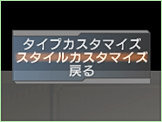
Select "Style Customization".
Select "Style Customization" from "Run GAS".
- STEP2
-
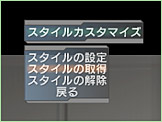
Select "Acquire Style".
Select "Acquire Style" from the customization items.
- STEP3
-
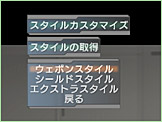
Select the style you want to customize.
Choose the style you want to acquire from the three styles.
- STEP4
-
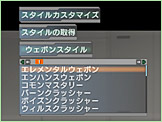
Select the ability you want to acquire.
After choosing a style, select the ability you want to acquire.
Each available ability shows its effect, the AP required, its level and so on. Acquiring a higher-level ability gives a greater effect.
- STEP5
-
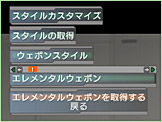
Confirm the ability.
Confirm the ability and select "Acquire (item name)".
- STEP6
-
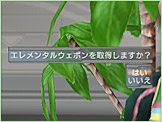
Acquire the ability.
A confirmation screen appears. If the selected ability is correct, select "Yes".
- STEP7
-
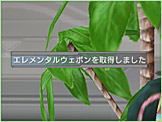
The ability is acquired.
AP is consumed and the selected ability is acquired.
How to use Style Customization (setting styles)
An acquired style has no effect on its own. Its effect only applies once you "Set Style".
- STEP1
-
Select "Style Customization".
Select "Style Customization" from "Run GAS".

- STEP2
-
Select "Set Style".
Select "Set Style" from the customization items.

- STEP3
-
Select the style you want to set.
Choose the style you want to set from the three styles.

- STEP4
-
Select the ability you want to set.
Once you choose a style, a list of acquired abilities is shown. Select the ability you want to set.

- STEP5
-
Set the ability.
Confirm the ability and select "Set (item name)".

- STEP6
-
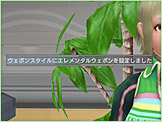
The ability is set.
The ability is set and its effect is applied to your character.
How to use Style Customization (removing styles)
"Remove Style" removes a style you have set.
- STEP1
-
Select "Style Customization".
Select "Style Customization" from "Run GAS".
- STEP2
-
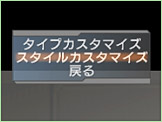
Select "Remove Style".
Select "Remove Style" from the customization items.

- STEP3
-
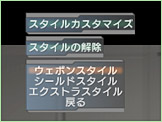
Select the style you want to remove.
Choose the style you want to remove from the three styles.
- STEP4
-
Remove the style.
Once you choose a style, the ability set to it is removed.
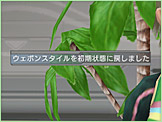
- Removing a style does not use AP.
- Note that removing a style does not refund the AP spent to acquire it.
About higher styles

Some Style Customization items reveal a new, higher style once acquired. After you acquire the higher style, the lower item it replaces is no longer shown.
- If the lower item is already set as a style, select the higher style again to get the higher effect.
- Some higher styles in Style Customization have acquisition requirements.
- A higher style's name is not shown in the list until you meet its requirements.
- When you acquire a higher style, the lower style that was its requirement is overwritten and replaced by the higher style.