PHANTASY STAR UNIVERSE Ambition of the Illuminus Online Manual
PHANTASY STAR UNIVERSE Online ManualBasics
Game Key Registration / Purchase (Windows PC)
Registering an "Illuminus Game Key" to your PSU ID lets you play the Story Mode of "PHANTASY STAR UNIVERSE Ambition of the Illuminus" (hereafter "Ambition of the Illuminus"), play Network Mode on the "Premium Course", purchase a Guardians License, and more.
Registering a "Game Key" lets you play the Story Mode of the Windows version of "PHANTASY STAR UNIVERSE" (hereafter "PSU").
- When playing at a SEGA-authorized internet café, you can play Story Mode without registering an Illuminus Game Key or Game Key.
- When playing at a SEGA-authorized internet café, you can play Network Mode on the "Premium Course" without registering an Illuminus Game Key or purchasing a Guardians License.
Notes on registering an "Ambition of the Illuminus" Game Key
Bonuses for purchasing and registering an "Ambition of the Illuminus" Game Key
Registering an Illuminus Game Key bought as a download grants up to 10 days of free "Premium Course" time and the in-game Room Goods item "Sonic".
Download-version Illuminus Game Keys "start with D, followed by numbers".
Example: D111-2222-3333-4444-5555
Bonuses for registering an "Ambition of the Illuminus" Game Key (packaged version only)
Registering an Illuminus Game Key from February 28, 2008 onward grants 15 days of free "Premium Course" time and the in-game Shadoog item "Sonichi (Dark Ver.)".
Packaged-version Game Keys "start with B, followed by numbers".
Example: B111-2222-3333-4444-5555
Other notes
Once registered, an Illuminus Game Key cannot be registered to another PSU ID. Registrations also cannot be changed or cancelled.
Notes on registering a "PSU" Game Key
Bonuses for purchasing and registering a "PSU" Game Key
Registering a "PSU" Game Key bought as a download grants up to 10 days of free "Premium Course" time and the in-game Room Goods item "Amy".
Download-version Game Keys "start with C, followed by numbers".
Example: C111-2222-3333-4444-5555
Bonuses for registering a Game Key for the previous game "PSU" (packaged version only)
Registering a Game Key for the previous game "PSU" (packaged version only) grants up to 30 days of free "Premium Course" time.
Owners of the "Best version" or "reduced-price version" also receive the in-game Room Goods item "Knuckles".
Packaged-version Game Keys are "all numbers" or "start with A, followed by numbers".
Example: 1111-2222-3333-4444-5555, or A111-2222-3333-4444-5555
- Network Mode for "Phantasy Star Universe" ended on Thursday, October 1, 2009. (Story Mode and Extra Mode are still playable.)
The in-game items can be obtained in "Ambition of the Illuminus". - To use the free "Premium Course" period in "Ambition of the Illuminus", you must register an Illuminus Game Key.
Carrying data over from the previous game "PSU" to "Ambition of the Illuminus"
If you are continuing to play with data from the previous game "PSU", be sure to use the PSU ID you used in "PSU".
To use Network Mode on the Premium Course, log in to the PSU ID management page with the PSU ID you used in "PSU" and register your Illuminus Game Key.
If you register an Illuminus Game Key while you already hold a valid usage right, the expiry date is extended according to that Game Key. However, if you use automatic renewal, the free "Premium Course" period from the Illuminus Game Key does not apply.
For owners of both a Game Key for the previous game "PSU" (packaged version only) and an "Ambition of the Illuminus" Illuminus Game Key
If you own both a Game Key for the previous game "PSU" (packaged version only) and an "Ambition of the Illuminus" Illuminus Game Key, and neither has ever been registered to a PSU ID, be sure to register the "PSU" Game Key (packaged version only) first. If you register the "Ambition of the Illuminus" Illuminus Game Key first and then register the "PSU" Game Key (packaged version only) to the same PSU ID, the free "Premium Course" period of up to 30 days does not apply.
Other notes
Once registered, a Game Key cannot be registered to another PSU ID. Registrations also cannot be changed or cancelled.
Game Key registration / purchase steps
Read the notes on registering a Game Key above carefully, then register your Illuminus Game Key / Game Key by following the steps below.
If you are continuing straight on from registering your PSU ID, you are already logged in to the PSU ID management page, so start from "2. Register a Game Key / Purchase a Game Key".
Registering / purchasing a Game Key on a PC
- STEP1
-
Log in with your PSU ID.
Open the PSU ID management page in Internet Explorer 6.0 or later. Once the management page is open, press the "Log in" button to go to the login page, then enter your PSU ID and password.

- STEP2-1
-
Register the Game Key.
After reading and agreeing to the terms, enter the 20-digit Illuminus Game Key or Game Key printed on the back cover of the instruction manual included with the product. Illuminus Game Keys / Game Keys bought from online stores are also registered here.
- STEP2-2
-
Purchase a Game Key.
If you do not have an Illuminus Game Key / Game Key, you can buy one here. Read and agree to the terms, then choose a payment method. The Illuminus Game Key / Game Key is registered automatically when the purchase completes, so it is very easy.
- STEP3
-
Game Key registration complete!
With an Illuminus Game Key registered, you can play Network Mode on the "Premium Course" during the free period. To keep playing Network Mode on the "Premium Course" after the free period ends, you need to purchase a Guardians License.

Registering a Game Key with a mobile phone
- Illuminus Game Keys / Game Keys cannot be purchased with a mobile phone.
- STEP1
-
Open the mobile billing and registration site.
On a mobile phone (Docomo / au / SoftBank) that can connect to the internet with SSL, scan the QR code (left) or enter the URL (http://segapsu.jp) directly to open the PSU ID management page.

- The PSU ID management page also carries the latest news.
- STEP2
-
Log in with your PSU ID.
Click the "Register here" button at the top of the billing and registration site to open the PSU ID login page, then enter your PSU ID and password.
- STEP3
-
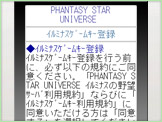
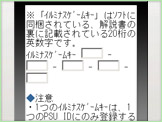
Register the Game Key.
After reading and agreeing to the terms, on the Game Key registration page enter the 20-digit Illuminus Game Key or Game Key printed on the back cover of the instruction manual included with the product. Illuminus Game Keys / Game Keys bought from online stores are also registered here.
- STEP4
-
Game Key registration complete!
With an Illuminus Game Key registered, you can play Network Mode on the "Premium Course" during the free period. To keep playing Network Mode on the "Premium Course" after the free period ends, you need to purchase a Guardians License.
