PHANTASY STAR UNIVERSE Ambition of the Illuminus Online Manual
PHANTASY STAR UNIVERSE Online ManualControls
Reading the Screen (City)
In cities the screen looks like this, and the Main Menu can be shown at the top of the screen.
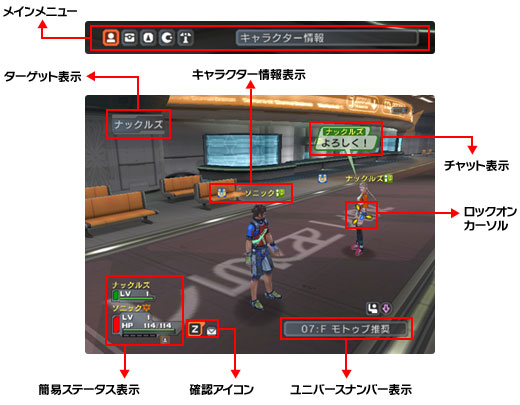
Main Menu
Press [Home] or [F1] to show / hide the Main Menu.
Lock-on cursor
A cursor that marks items, devices you can operate and so on. Press [Enter] to operate the target.
It is also shown on other players.
Target display
Press [Enter] while another player's name is shown to open the Lock-on Menu.
Notification icon
Shown when you receive new information such as simple mail, partner cards and party invitations.
Press [Z] to enter icon selection mode, choose with [←] [→] and press [Enter] to see what you received.
Chat display
Shows the chat entered by you and other players.
Universe number display
Shows the name and number of the Universe you are playing in (except in My Room and fields).
Quick status display

Character name / leader icon
Shows the character's name, plus the leader icon if you are the party leader.
- Shown for the party leader, or when playing solo. In Story Mode it is always shown on your character.
Character color
Shows the color set for the character. In a party, each character gets a different color.
Level
Shows the character's level.
Current / max HP
Shows the character's current / max HP.
HP gauge
Shows the character's HP as a gauge.
Experience gauge
Shows the experience the character has earned as a gauge. You level up when it is full.
Blast gauge
The gauge fills as you take damage or attack enemies in combat. When it is full, you can activate Nanoblast or an SUV Weapon.
*From 2011/9/22, a dedicated SUV system was added for Humans and Newmans, so they can now use SUV Weapons. (Added 2011/9/22)
Auto-run icon
Shown during auto-run.
Character info display
Character info is shown above each character's head.
Press [Ctrl] on the keyboard to change what is shown.
Each press cycles through the following (from the top).
- Name + online status
- Name
- Name + level
- Partner card number
- Type + Type level
- Nothing shown
You can also change what is shown with a chat command. See below for details.
Icon list
Icons showing the player's state may be shown next to the character info text.
The icons are as follows.
 |
In a party (you) / in the same party (other players) |
 |
In another party |
 |
Party has accepted a mission |
 |
Star Spirit Fortune |
[Enter] display
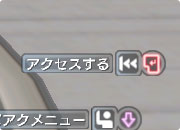
Shown when you can talk to another character, pick up an item, operate a device and so on.