PHANTASY STAR UNIVERSE Ambition of the Illuminus Online Manual
PHANTASY STAR UNIVERSE Online ManualControls
Auto-Run / Following Party Members
"Auto-run" keeps your character running while moving.
Auto-run

While your character is moving, press [R] to toggle auto-run ON/OFF. During auto-run you can also steer with [W] [A] [S] [D].
An auto-run icon is shown below the quick status display during auto-run.
- You can also turn auto-run OFF with [R], [↓], [→], or by holding [←].
Following party members
You can automatically follow a party member.
Choosing who to follow
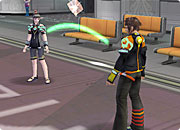
You can choose who to follow from the party members near you.
Select the party member you want to follow with [I] [K]. Once you choose, a green arch appears between you for a while and the quick status display turns orange.
- You cannot follow partner characters (NPCs).
Start following

Choose someone and press [R] to start following. A green arch like the one shown when choosing appears when you start.
You automatically follow when they move, and even if you move in another direction, you start following again once you stop pressing [W] [A] [S] [D]. If they move to another area, you follow them into it.
- You can switch from auto-run to following by choosing someone during auto-run, and switch who you follow to another party member while following.
Following ON/OFF
While following, press [R] to toggle following ON/OFF.
Depending on the situation (running, standing still, in a city or field, etc.), you can also turn it OFF with [↓], [→] or by holding [←].
Icon display
During auto-run or following, the following icons are shown below the quick status display and in the character info display.
 |
Auto-running |
 |
Following |