PHANTASY STAR UNIVERSE Ambition of the Illuminus Online Manual
PHANTASY STAR UNIVERSE Online ManualGC (Guardians Cash)
GC Gachan
"GC Gachan" is one of the GC Shop's products.
You can play it by selecting a product with "Gachan" in its name.
Playing "GC Gachan" gives you one random item from the item list.
- STEP1
-
Select a Gachan product.
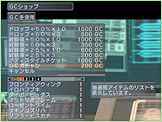
Move the cursor to a Gachan product in the GC Shop's product list to see the list of items you can get.
- STEP2
-
Buy the Gachan product.
The GC required and your GC after purchase are shown.
If the product name and other details are correct, select "Yes".

- STEP3
-
The draw starts.
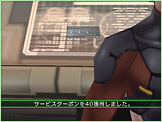
When the GC is spent, you receive a service coupon and the draw starts. You can skip the draw animation by pressing the confirm button.
- STEP4
-
You get an item.
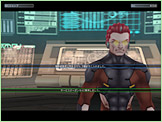
When the draw ends, you get one random item from the item list.
- If you try to buy with no free space in your inventory, a warning is shown and no GC is spent. In that case, end the mission, free up inventory space, and start again from STEP 1.
- Before buying a product, always check the GC required and the product name. GC cannot be refunded after purchase.
- GC Gachan always gives you some item, but you may get an item that the character who played cannot use.
- Note that if the "stackable item" drawn in GC Gachan does not fit in your inventory, it is changed to a different item.